


일상 속 변화를 만드는 맞춤형 복지사업
일상 속 변화를 만드는 복지사업
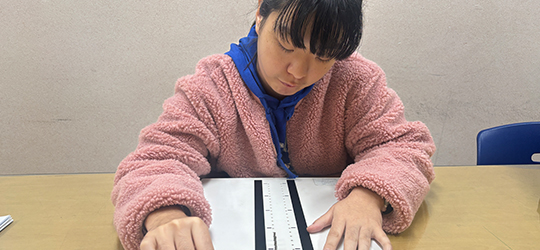
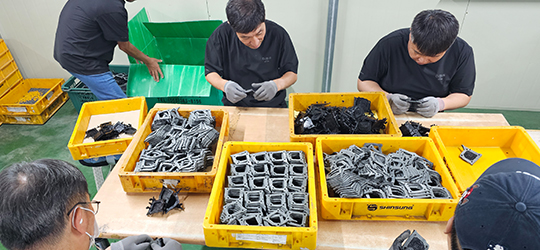

지역사회에서 안정적인 경제활동을 이어갈 수 있도록 단계별로 지원합니다.
구직 상담부터 직업능력 평가, 취업 연계, 취업 후 사후관리까지 개인의 특성과 욕구에 맞춘
맞춤형 직업지원 체계를 운영하고 있습니다.
| 프로그램명 | 대상 | 이용정원 | 내용 | 이용료 | 문의 |
|---|---|---|---|---|---|
| 구직상담 | 성인장애인 | 제한없음 | 취업 욕구 파악, 경력·직업적성 상담, 취업경로 설정 | 무료 | 발달장애인지원팀 |
| 직업능력평가 | 성인장애인 | 제한없음 | 직업능력 검사(MDS, 손기능 검사 등), 취업 적합성 판단 | 무료 | 발달장애인지원팀 |
| 취업알선 및 취업연계 | 성인장애인 | 제한없음 | 구인업체 면접 연계, 현장 면접 동행, 취업 지원 | 무료 | 발달장애인지원팀 |
| 중증장애인 지원고용사업 | 성인장애인 | 제한없음 | 현장훈련, 직무지도원 배치, 취업 연계 | 무료 | 발달장애인지원팀 |
| 프로그램명 | 대상 | 이용정원 | 내용 | 이용료 | 문의 |
|---|---|---|---|---|---|
| 장애인일자리사업 | 성인장애인 | 32명 | 공공·복지기관 직무 배치, 사회참여형 일자리 | – | 발달장애인지원팀 |
| 충북형최중증 권리중심일자리사업 |
성인장애인 | 10명 |
최중증장애인 재능중심 일자리 제공 – 기본교육, 활동평가회 – 직무별교육(인식개선활동, 문화예술활동) |
– | 발달장애인지원팀 |
| 일하는밥퍼 | 성인장애인 | 20명 |
1일 3시간 자발적 사회공헌 활동 및 경제적 안정망 제공 문구류 포장작업 |
– | 발달장애인지원팀 |
| 프로그램명 | 대상 | 이용정원 | 내용 | 이용료 | 문의 |
|---|---|---|---|---|---|
| 기초체력단련 | 성인장애인 | 18명 | 스트레칭, 근력운동(덤벨, 밴드, 맨몸 프리 웨이트-스쿼트, 제자리 점프 등), 서킷트레이닝(스탭박스, 왕복 달리기, 줄넘기 등) | 70,000원 | 발달장애인지원팀 |
| 직업준비훈련 | 성인장애인 | 18명 | 기본교육, 대인관계기술 교육, 인권교육, 안전교육, 경제교육, 위생교육 | 70,000원 | 발달장애인지원팀 |
| 수작업훈련 | 성인장애인 | 18명 | 자동차 부품조립, 토이만들기, 보석십자수, 클레이아트, 목공예 등 | 70,000원 | 발달장애인지원팀 |
| 작업활동 | 성인장애인 | 18명 | 자동차 조립 (구멍뚫기, 조립하기, 검수하기, 포장하기, 납품하기) | 70,000원 | 발달장애인지원팀 |
| 소중한 나의 인권, 나의 성 |
성인장애인 | 18명 | 인권교육 2회, 성교육 2회 (전문강사 초빙) | 70,000원 | 발달장애인지원팀 |
| 여가문화활동 | 성인장애인 | 18명 | 지역 내 문화시설 이용하기 (노래방, 영화, 만화카페 등), 나들이 | 70,000원 | 발달장애인지원팀 |
| 현장견학 및 체험 | 성인장애인 | 18명 | 지진안전체험, 생활안전체험, 화재안전체험, 목공예체험 등 | 70,000원 | 발달장애인지원팀 |
| 이용자자치회의 | 성인장애인 | 18명 | 자기결정훈련을 통한 자기결정권 향상 | 70,000원 | 발달장애인지원팀 |
| 바리스타 직무교육 | 성인장애인 | 18명 | 서비스교육, 바리스타 업무교육, 도란도란(관내 카페) 운영 등 | 70,000원 | 발달장애인지원팀 |






우리는 당신의 행복한 삶을 응원합니다.
복지관
사업
나눔
알림
복지맵
음성군장애인복지관 (이하 “복지관 ”)은「개인정보보호법 」에 따라 이용자의 개인정보 보호 및 권익을 보호하고 개인정보와 관련한 이용자의 고충을 원활하게 처리할 수 있도록 다음과 같은 처리방침을 두고 있습니다 .
복지관은 개인정보를 다음의 목적을 위해 처리합니다 . 처리한 개인정보는 다음의 목적 이외의 용도로는 사용되지 않으며 이용 목적이 변경될 시에는 사전 동의를 구할 예정입니다 .
| 연번 | 대상 | 운영근거/처리목적 | 개인정보 항목 | 보유기간 |
|---|---|---|---|---|
| 1 | 이용자 | 이용자- 운영근거 : 사회복지사업법 제6조의2, 제33조 – 처리목적 : 진단 및 상담, 서비스 제공, 전산 입력 |
생년월일, 이름, 성별, 주소, 직업, 장애유형, 유·무선전화 중 1개 이상 등 | 준영구 |
| 2 | 후원자 | 후원자- 운영근거 · 사회복지사업법 제6조의2 · 기부금품의 모집 및 사용에 관한법률 시행령 19조 · 개인정보보호법 제24조 · 소득세법 제34조1 · 법인세법 제24조의1 – 처리목적 : 후원자 관리, 후원행사 안내, 기부영수증 발행, 기부내역 제공 |
주민등록번호, 이름, 주소, 유·무선전화 중 1개 이상, 계좌번호, 후원내역 등 | 후원 종료일(해지일) 후 5년 |
| 3 | 자원봉사자 | 자원봉사자- 운영근거 : 사회복지사업법 제9조 – 자원봉사활동 기본법 시행령 제15조 |
이름, 주소, VMS 아이디, 유·무선전화 중 1개 이상 등 | 준영구 |
| 4 | 사회복지현장실습 참여자 | 운영근거 : 사회복지사업법 시행규칙 제3조 – 처리목적 : 실습 진행 및 평가, 지역사회 및 이용자의 안전한 기관 이용 |
이름, 주소, 유·무선전화 중 1개 이상, 학교, 학과 및 학년 등 | 준영구 |
| 5 | 사회복지시설 종사자 | 운영근거 : 사회복지사업법 제6조의2(사회복지업무의 전산화) – 처리목적 : 직원 업무·임금 관리 |
주민등록번호, 이름, 주소, 연락처 등 | 준영구 |
| 6 | 외부강사 | 운영근거 : 소득세법 제21조 – 처리목적 : 강사의뢰, 강사료 지급, 강의 안내 및 홍보 |
성명, 연락처, 소속, 지위, 학력 및 경력, 주민등록번호, 계좌정보 | 등록 후 5년 |
| 7 | 홈페이지 | 운영근거 : 개인정보보호법 제21조 – 처리목적 : 온라인 상담/신청/후원·자원봉사 신청, 회원관리, 부정이용 방지, 게시판 글쓰기, 기관방문·자원봉사·후원 신청/확인, 고지·통지 |
성명, 연락처, 이메일, 생년월일, 주소, 계좌번호(CMS 후원신청) | 회원 탈퇴 시 지체 없이 파기 |
복지관은 정보주체의 동의, 법률의 특별한 규정 「개인정보 보호법」 제17조 및 제18조에 해당하는 경우에만 개인정보를 제3자에게 제공합니다. 다음의 경우에는 개인정보를 제3자에게 제공할 수 있습니다.
복지관은 다음과 같이 개인정보를 제3자에게 제공하고 있습니다.
| 대상 | 제공받는 자 | 제공항목 | 제공목적 | 이용 및 보유기간 |
|---|---|---|---|---|
| 이용자 | 정부 및 공공기관, 사회복지사업법 제16조 및 제34조 등에 의거하거나 신고된 복지시설 | 성명, 생년월일, 연락처, 주소, 서비스 이력, 상담기록, 장애유형 등 | 행정처리 및 서비스 연계, 외부 평가 및 감사 등 | 준영구 |
| 후원자 | 국세청, 금융기관, 관공서 | 성명, 연락처, 주소, 주민등록번호, 계좌번호, 후원내역 | 후원금 영수증 발급, CMS 이용, 결과보고/공개, 연말정산 간소화 서비스 등 | 후원 종결 후 5년 |
| 자원봉사자 | 자원봉사 포털, 사회복지시설 평가기관 | 성명, 성별, 생년월일, 자원봉사 이력 | 자원봉사 이력관리 및 봉사실적 등록, 행정보고 | 준영구 |
| 사회복지현장실습 참여자 | 해당 대학, 자격관리 협회 | 성명, 연락처, 생년월일, 실습이수시간, 실습지도 및 평가 | 실습지도 및 실습생 평가, 실습 증명 | 준영구 |
| 사회복지시설 종사자 | 국세청, 정부, 지자체 | 성명, 주소, 주민등록번호 | 행정처리, 외부 평가 및 감사 등 | 준영구 |
| 외부 강사 | 국세청, 지자체 | 성명, 주소, 주민등록번호 | 원천징수 신고, 교육/프로그램 결과보고 등 | 종결 후 5년 |
후원 관련 업무 수행을 위해 다음과 같이 개인정보가 제공될 수 있습니다.
| 구분 | 제공받는 자 | 제공항목 |
|---|---|---|
| 세액감면 혜택제공 및 기부금영수증 명세 확인 | 국세청 | 주민등록번호, 이름, 연락처, 기부금액, 주소 |
| CMS 출금이체 서비스 제공 및 출금 동의 확인 | 금융기관 | 이름, 생년월일, 은행명, 계좌번호, 기부금액 |
| 기관의 후원금(품) 수입사용 결과보고 및 공개 | 관공서 | 이름, 후원일, 후원금(품)액 및 내용 |
복지관은 원활한 개인정보 업무처리를 위하여 다음과 같이 개인정보 처리업무를 위탁하고 있습니다.
복지관은 원활한 기부금 승인 정산을 위해 다음과 같이 개인정보 처리업무를 위탁하고 있습니다.
| 구분 | 위탁받는 자(수탁자) | 위탁하는 업무의 내용 |
|---|---|---|
| 후원금(CMS) 출금 | 인사 및 후원자 관리 / 사회복지시설정보시스템(https://www.ssis.go.kr) | CMS 출금 의뢰, 종사자·후원자관리, 회계관리 |
| 자원봉사자 관리 | 사회복지 자원봉사인증관리(https://www.vms.or.kr), 1365자원봉사포털(https://www.1365.go.kr) | 자원봉사자 등록 및 인증서 발급 |
| 홈페이지 | 아이웹플디자인 | 홈페이지 컨텐츠, 게시판 등 유지보수 |
복지관은 개인정보 보유기간의 경과, 처리목적 달성 등 개인정보가 불필요하게 되었을 때에는 지체 없이 해당 개인정보를 파기합니다.
복지관은 개인정보의 안전성 확보를 위해 관리적·기술적·물리적 조치를 취하고 있습니다.
복지관은 이용자에게 맞춤형 서비스를 제공하기 위해 쿠키를 사용할 수 있으며, 이용자는 쿠키 저장을 거부할 수 있습니다.
복지관은 개인정보 처리에 관한 업무를 총괄해서 책임지고, 개인정보 처리와 관련한 정보주체의 불만처리 및 피해구제를 위하여 개인정보 보호책임자를 지정하고 있습니다.
복지관은 시설안전 및 화재예방 등을 목적으로 영상정보처리기기를 설치·운영하고 있습니다.
이 개인정보처리방침은 변경될 수 있으며, 변경 시 홈페이지를 통해 공지합니다.
개인정보 침해에 대한 신고·상담이 필요한 경우 관련 기관에 문의하실 수 있습니다.
음성군장애인복지관
We firmly believe that the internet should be available and accessible to anyone, and are committed to providing a website that is accessible to the widest possible audience, regardless of circumstance and ability.
To fulfill this, we aim to adhere as strictly as possible to the World Wide Web Consortium’s (W3C) Web Content Accessibility Guidelines 2.1 (WCAG 2.1) at the AA level. These guidelines explain how to make web content accessible to people with a wide array of disabilities. Complying with those guidelines helps us ensure that the website is accessible to all people: blind people, people with motor impairments, visual impairment, cognitive disabilities, and more.
This website utilizes various technologies that are meant to make it as accessible as possible at all times. We utilize an accessibility interface that allows persons with specific disabilities to adjust the website’s UI (user interface) and design it to their personal needs.
Additionally, the website utilizes an AI-based application that runs in the background and optimizes its accessibility level constantly. This application remediates the website’s HTML, adapts Its functionality and behavior for screen-readers used by the blind users, and for keyboard functions used by individuals with motor impairments.
If you’ve found a malfunction or have ideas for improvement, we’ll be happy to hear from you. You can reach out to the website’s operators by using the following email
Our website implements the ARIA attributes (Accessible Rich Internet Applications) technique, alongside various different behavioral changes, to ensure blind users visiting with screen-readers are able to read, comprehend, and enjoy the website’s functions. As soon as a user with a screen-reader enters your site, they immediately receive a prompt to enter the Screen-Reader Profile so they can browse and operate your site effectively. Here’s how our website covers some of the most important screen-reader requirements, alongside console screenshots of code examples:
Screen-reader optimization: we run a background process that learns the website’s components from top to bottom, to ensure ongoing compliance even when updating the website. In this process, we provide screen-readers with meaningful data using the ARIA set of attributes. For example, we provide accurate form labels; descriptions for actionable icons (social media icons, search icons, cart icons, etc.); validation guidance for form inputs; element roles such as buttons, menus, modal dialogues (popups), and others. Additionally, the background process scans all the website’s images and provides an accurate and meaningful image-object-recognition-based description as an ALT (alternate text) tag for images that are not described. It will also extract texts that are embedded within the image, using an OCR (optical character recognition) technology. To turn on screen-reader adjustments at any time, users need only to press the Alt+1 keyboard combination. Screen-reader users also get automatic announcements to turn the Screen-reader mode on as soon as they enter the website.
These adjustments are compatible with all popular screen readers, including JAWS and NVDA.
Keyboard navigation optimization: The background process also adjusts the website’s HTML, and adds various behaviors using JavaScript code to make the website operable by the keyboard. This includes the ability to navigate the website using the Tab and Shift+Tab keys, operate dropdowns with the arrow keys, close them with Esc, trigger buttons and links using the Enter key, navigate between radio and checkbox elements using the arrow keys, and fill them in with the Spacebar or Enter key.Additionally, keyboard users will find quick-navigation and content-skip menus, available at any time by clicking Alt+1, or as the first elements of the site while navigating with the keyboard. The background process also handles triggered popups by moving the keyboard focus towards them as soon as they appear, and not allow the focus drift outside it.
Users can also use shortcuts such as “M” (menus), “H” (headings), “F” (forms), “B” (buttons), and “G” (graphics) to jump to specific elements.
We aim to support the widest array of browsers and assistive technologies as possible, so our users can choose the best fitting tools for them, with as few limitations as possible. Therefore, we have worked very hard to be able to support all major systems that comprise over 95% of the user market share including Google Chrome, Mozilla Firefox, Apple Safari, Opera and Microsoft Edge, JAWS and NVDA (screen readers).
Despite our very best efforts to allow anybody to adjust the website to their needs. There may still be pages or sections that are not fully accessible, are in the process of becoming accessible, or are lacking an adequate technological solution to make them accessible. Still, we are continually improving our accessibility, adding, updating and improving its options and features, and developing and adopting new technologies. All this is meant to reach the optimal level of accessibility, following technological advancements. For any assistance, please reach out to